
For podcasters with YouTube channels and WordPress websites
Bring Your Youtube Podcast to Your Website
Easy TubeCasting brings your YouTube episodes, playlists, channel, or hand-picked videos into WordPress with a responsive Spotlight Player, searchable episode list, and automatic syncing.
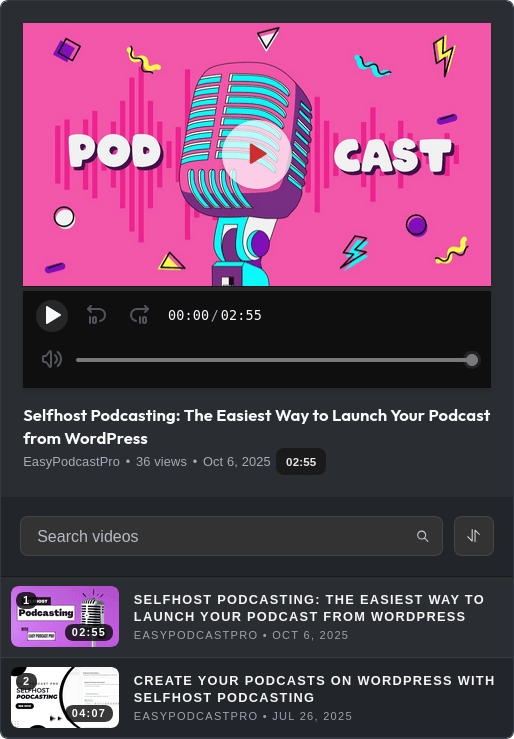
Your website should be more than a link back to YouTube.
Easy TubeCasting gives podcast visitors a clean place to watch, browse, search, and continue exploring your show without forcing you to rebuild an episode archive by hand.
Podcast-grade player
Feature one episode in a large Spotlight Player while the rest of your archive stays visible and easy to browse.
Searchable episode list
Visitors can search by episode title and sort by newest, oldest, most viewed, longest, or A-Z.
Automatic syncing
With a valid YouTube Data API key, playlist and channel content can refresh automatically as new episodes go live.
Flexible sources
Embed one video, selected videos, playlists, channels, usernames, custom channel URLs, or @handles.
Brand-aware styling
Choose light or dark mode and set an accent color so the player fits your podcast website.
Built for large archives
Batch loading, Load More, and metadata caching help keep larger podcast collections manageable.
Publish a podcast archive without rebuilding your site.
Add the block, paste your YouTube URL, tune the display, and publish. For playlists and channels, the built-in setup guide walks you through the YouTube Data API key.
Install Easy TubeCasting
Start from your WordPress dashboard like any other plugin.
Add an API key for channels and playlists
The settings screen includes a guided checklist, validation, masked storage, and revalidation.
Paste your YouTube URL into the block
Use a video, playlist, channel, username, @handle, or comma-separated video URLs.
Choose display settings and publish
Set batch size, theme mode, and accent color for your podcast page.
Use it anywhere your audience expects episodes.
Latest episodes page
Full video podcast archive
Topic-based playlist
Network pages with multiple shows
Bring your YouTube podcast to Home
Turn your channel into a searchable, watchable podcast archive built for your own website.
Have Any Questions?
Browse our FAQ section or ask us using the contact form. We will be happy to reply to your queries.
Do I need a YouTube API key?
Not for single videos or hand-picked video lists. Yes for playlists, channels, usernames, and handles.
Can I show my latest episodes automatically?
Yes. With automatic sync enabled and a valid YouTube Data API key, the plugin can refresh saved playlist or channel data.
Does it work with the Classic Editor?
The supported editing experience is the WordPress block editor.
What do updates include?
Updates include new features, improvements in existing features, performance enhancements and bug fixes.
What kind of support can I expect?
We take support very seriously. Top-notch customer support for Active license key holders is key for a quality product, so we’ll do our very best to resolve any issues you encounter via email support. Please check our support policy for more information.